AI Mode

In the AI mode, the system predicts PV yield and load demand based on the meteorological data, and leverages real-time tariff to decide on the optimal electricity dispatch strategy, thus maximizing the revenue.

Prerequisite

Note:
  • AI mode is supported only when the Consumption tariff type is set to Dynamic tariff or Time-of-use tariff.

  • A certain amount of data accumulation is required for AI mode to predict future production and consumption more accurately.
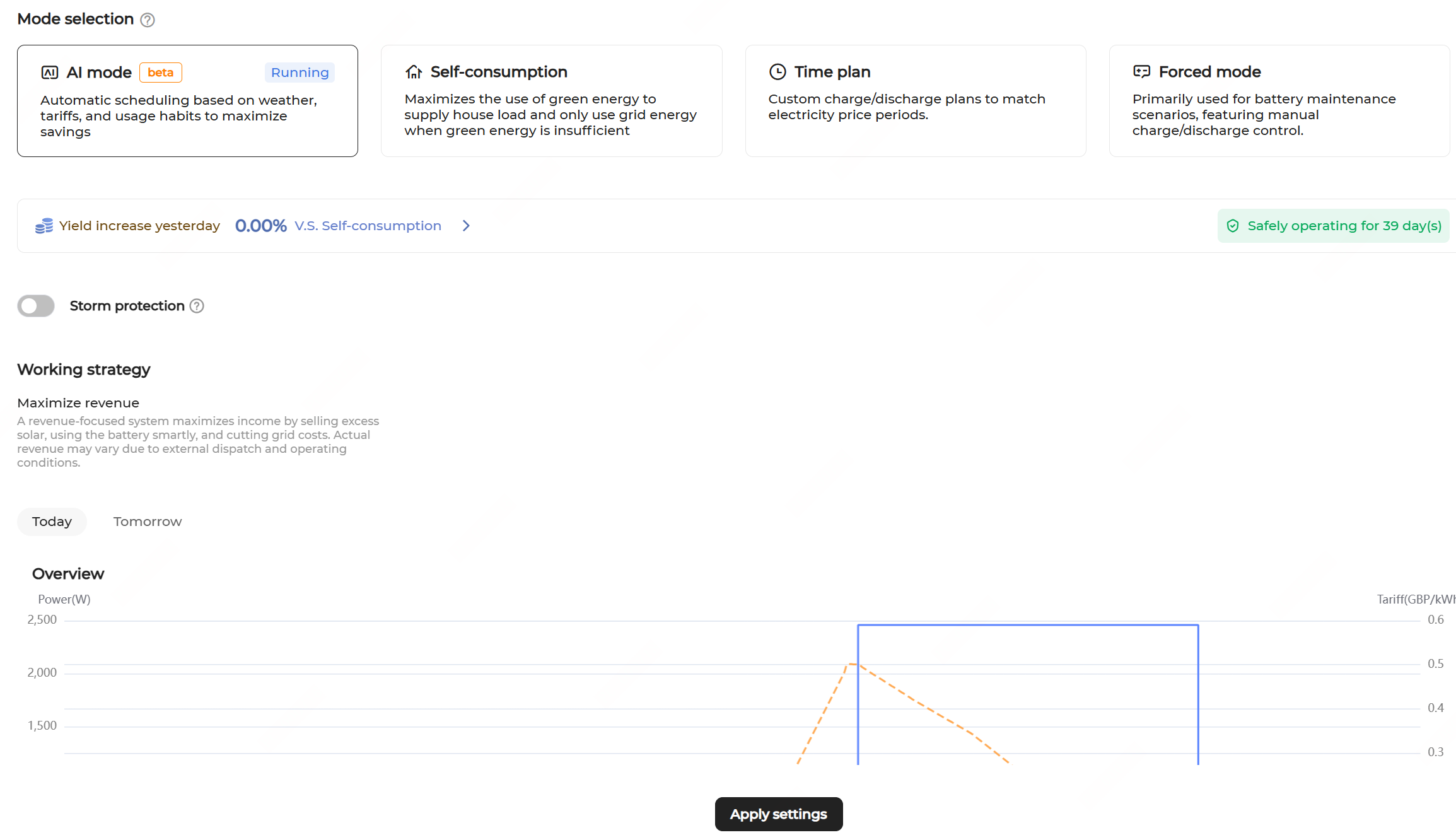
  1. Navigate to the Energy management page and select the AI mode.
  2. Yield increase yesterday is displayed on the page. You can click it to go to the Revenue calendar screen and view monthly, annual, and total yield increase percentages or values.
  3. Turn on or off Storm protection as needed.
    • If the function is enabled, upon receiving an extreme weather alert, the system charges at maximum capacity until reaching the SOC upper limit, ignoring all the preset restrictions. When the extreme weather ends, the system will restore to the previous operating mode.
    • If the function is disabled (default), the system will work as per the set working strategy.
  4. Click Apply settings.

    When the system operates in this mode, the AI mode page displays today's yield and consumption and curves about tariff and battery working strategy. Click Tomorrow to view the energy use forecast curve for the next day.