Overload Protection
Overload protection is used to regulate the charging power of the ESS, so as to ensure the power of the transformer at the grid-connection point does not exceed the rated capacity, thus preventing overload damage.
- Choose .
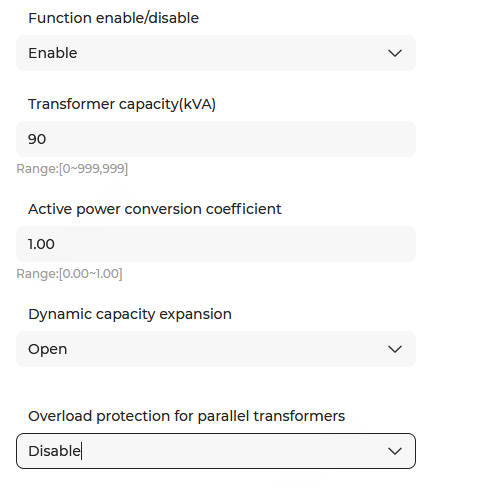
- Click
 to set Function enable/disable.
Enable: Enable the overload protection function. Configure the following parameters:
Parameters
Description
Transformer capacity (kVA) The capacity of the transformer at the grid-connection point. Set this parameter based on the actual situation.
Note: This parameter is only configurable when the Overload protection for parallel transformers is set to Disable.Active power conversion coefficient The default value is 1, and the value ranges from 0 to 1.
Protection trigger threshold = Transformer capacity × Active power conversion coefficient (Protection is enabled when the transformer-side power is greater than or equal to the threshold)
Note: This parameter is only configurable when the Overload protection for parallel transformers is set to Disable.Dynamic capacity expansion - Enable: Prioritize reducing the ESS charging power during overload. If it is reduced to 0 and still overloaded, the ESS will start discharging.
- Disable: Only reduce the ESS charging power during overload (ESS discharge is prohibited).
Overload protection for parallel transformers When multiple overload monitoring meters are connected to the system and overload protection is required for multiple parallel transformers, the Overload protection for parallel transformers can be enabled, and the following parameters can be configured: - Transformer capacity (kVA): Set the capacity value of the transformer connected to the current overload monitoring meter.
- Impedance voltage (%): Set the impedance voltage percentage of the current transformer.
- Active power conversion coefficient: Default value: 1. Range: 0–1.Note: Set to 0 to indicate that the transformer is excluded from overload protection.
- DI port: Connect an external DI signal. If the circuit breaker connected to this DI opens, this transformer will be excluded from overload protection.Note: The corresponding DI port point should be configured as parallel transformer circuit breaker closing feedback.
- Remarks: Display the configuration remarks for the DI port.
If it is set to Disable, the overload protection function is turned off.