Zero Export
The zero export strategy prevents the PV-ESS system from feeding power into the grid. If the discharging power of the PV-ESS system exceeds the load power, the system will automatically reduce the PV output, lower the discharging power, or charge the batteries to prevent power back-feeding.
- Click
 to set Function enable/disable.
- Enable: Enable the zero export function. Configure the following parameters:
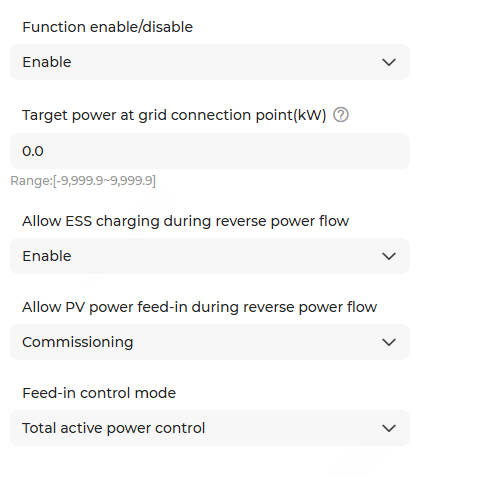
Parameter
Description
Target power at grid connection point (kW) The default value is 0.0. It is recommended to set this value to -1% to -2% of the rated active power of the ESS.
When the actual power at the grid connection point > the set target value, the system will automatically reduce the ESS discharge or PV output.
Allow ESS charging during reverse power flow - Enable: If the ESS discharging power is reduced to zero and power back-feeding persists, the ESS switches to charging mode to absorb PV output.
- Disable (default): If the ESS discharging power is reduced to zero and power back-feeding persists, the ESS maintains zero power output.
Allow PV power feed-in during reverse power flow - Enable (default): When power back-feeding occurs, PV power feed-in is allowed.
- Disable: When power back-feeding occurs, PV output power is reduced to prevent power feed-in.Note: This feature is available on EMS300CP-SV100.001.00.P027 or later.
Feed-in control mode - Total active power control: Default option. The system determines whether to trigger the control strategy based on the total active power value.
- Per-phase active power control: The system determines whether to trigger the control strategy based on the active power value of each phase.Note: A three-phase four-wire meter is required to measure the A/B/C phase power.
Note: This feature is available on EMS300CP-SV100.001.00.P024 or later. - Disable: Disable the zero export function.
- Enable: Enable the zero export function. Configure the following parameters: