Off-Grid Operation
In the event of off-grid startup, if the PV power system supplies both the ESS equipment and the loads, the user can set different PV active power for different power supply scenarios.
- Choose .
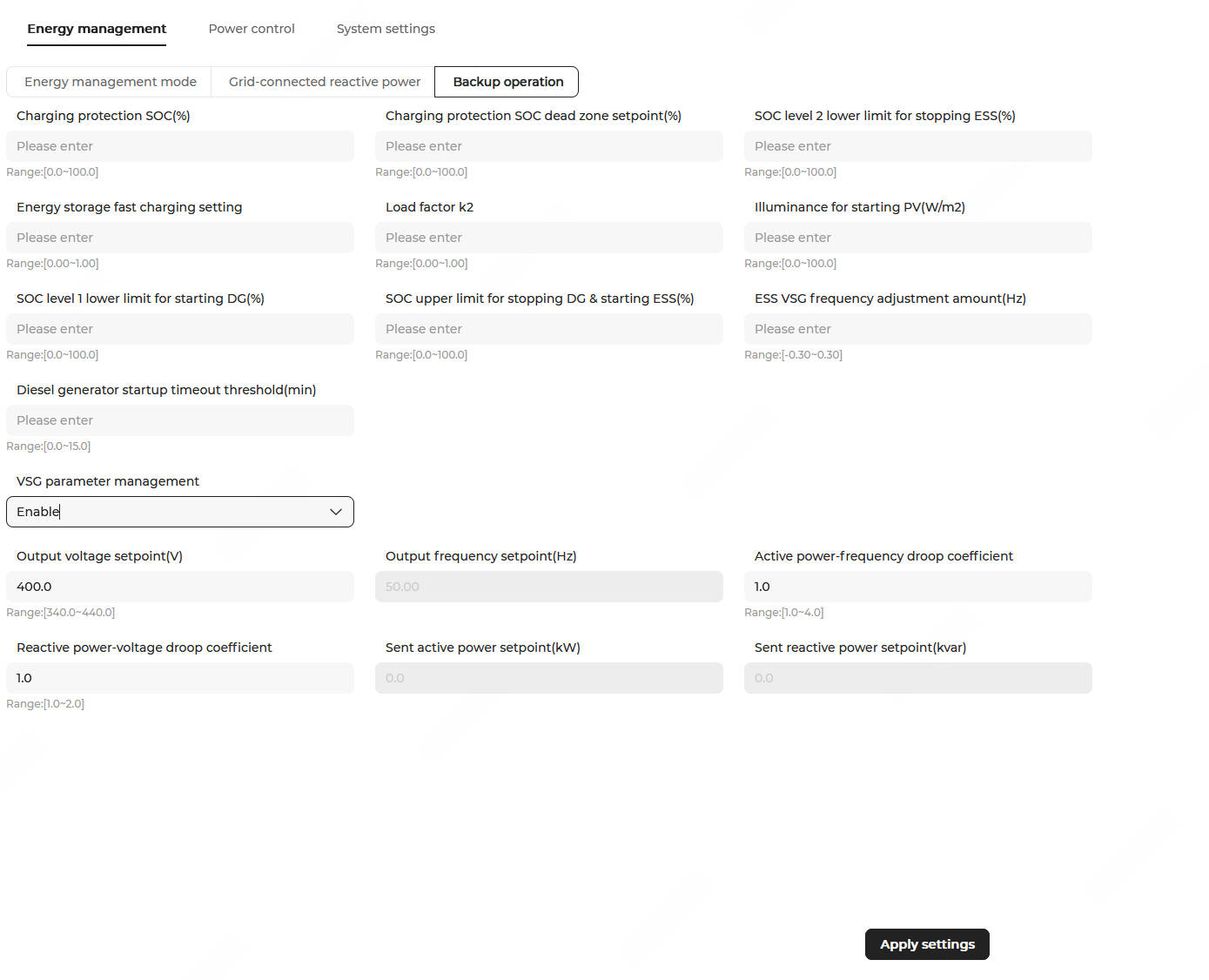
- Configure the following parameters:
Parameter
Description
Value Charging protection SOC (%) When the maximum SOC across energy storage units ≥ the threshold, the system stops charging. In PV-ESS scenarios, the system limits the PV generation power to bring the charging power to zero. In ATS running (off-grid, diesel generator) mode, the system automatically switches to the ATS running (off-grid, VSG mode) mode. Default value: 90.0. Range: 0.0–100.0.
Charging protection SOC deadband (%) It defines the range within which the target charging protection SOC value can fluctuate. Default value: 2.0. Range: 0.0–100.0. SOC for stopping DG & starting ESS (%)(1) When the ESS SOC ≥ the threshold, a shutdown command is issued to the diesel generator.
Default value: 80.0. Range: 0.0–100.0.
SOC for starting DG (%)(1) When the ESS SOC ≤ the threshold, a startup command is issued to the diesel generator.
Default value: 25.0. Range: 0.0–100.0. SOC for ESS shutdown pre-alarm clear (%)(3) When the ESS SOC ≥ the threshold, set the measuring point "ESS shutdown pre-alarm" of the automatic transfer switch (ATS) to 0.
Note: The firmware version of EMS300CP must be P024 or later.Default value: 20.0. Range: 0.0–100.0. SOC for ESS shutdown pre-alarm (%)(3) When the ESS SOC ≤ the threshold, set the measuring point "ESS shutdown pre-alarm" of the ATS to 1.
Note: The firmware version of EMS300CP must be P024 or later.Default value: 15.0. Range: 0.0–100.0.
SOC for stopping ESS (%) When the ESS SOC ≤ the threshold, a shutdown command is issued to the ESS.
Note: When a meter with the Meter purpose set to Diesel generator meter is present in the system and the diesel generator is detected to be operating normally, the system will issue a command to close the grid-connected circuit breaker.Default value: 10.0. Range: 0.0–100.0.
Irradiance for starting PV (W/m2) When the PV irradiance ≥ the threshold, a startup command is issued to the ESS. Note: This parameter applies to scenarios where PV irradiance data is obtained through a data logger.Default value: 50.0. Range: 0.0–100.0.
ESS charging power factor When the maximum SOC across energy storage units < the charging protection SOC, PV active power setpoint = (ESS charging power factor × Min. chargeable power across energy storage units × Number of energy storage units) + (Load factor K2 × Load power). Default value: 0.80. Range: 0–1.00.
Load factor K2 When the ESS is fully charged and power is supplied only to the loads, PV active power setpoint = Load factor K2 × Load power. Default value: 0.98. Range: 0–1.00.
Conventional load power (kW)(2) Set this parameter to the total power demand value of all electrical equipment and loads in the system except chargers. If the value is set too small, the power supplied to chargers will be too high, resulting in insufficient power supply. If the value is set too large, the power supplied to chargers will be too low, affecting charging time. The default value is 10.0. The value must be greater than 0. The maximum value cannot exceed the maximum discharge capacity of the ESS.
SOC for stopping charger (%)(2) When the SOC of the ESS (Number of available energy storage units × Remaining power of a single energy storage unit) < the value of this parameter, the system stops supplying power to the chargers to ensure the power demand of conventional loads.
It is recommended to set this value to (Rated power of conventional loads × Required duration) / Total capacity of ESS.
Default value: 50. Range: 0–100.
Frequency regulation offset for VSG mode (Hz)(3) When the system is operating in ATS running (off-grid, diesel generator) mode, the VSG frequency is adjusted to finely control the ESS charging power. The core objective is to prevent continuous SOC decline that could lead to shutdown, ensuring that the ESS maintains a low-power charging state while meeting load demand and preventing generator overload.
Modify the parameter as follows:- Shut down the system using one-click shutdown, and adjust this parameter in steps of 0.01–0.02 Hz (for example, 0.02 Hz).
- Start up the system. After ATS off-grid startup (diesel generator) or ATS off-grid startup (VSG mode) and then switching to ATS running (off-grid, diesel generator), this parameter takes effect.
- If, after startup, the ESS charging power meets the low-power charging requirement, no further adjustment is needed. If the ESS charging power does not meet the requirement, return to step a and continue adjustment.Note: The recommended low-power charging range is ≤ 20 kW. If this affects user loads, it may be further reduced to 10 kW.
Default value: 0. Range: -0.30 to 0.30.
DG startup timeout (min)(4) The waiting time after the DO issues the diesel generator startup/shutdown command. If this time is exceeded, the system assumes the diesel generator has started up/shut down.
Default value: 5.0. Range: 0–15.0.
Note: (1) This parameter is displayed only when diesel generators are connected to the system. The system supports two diesel generator access methods:(2) This parameter is displayed only when chargers are connected to the system.
(3) This parameter is displayed only when ATSs are connected to the system.
(4) This parameter is displayed only when diesel generators and ATSs are connected to the system.
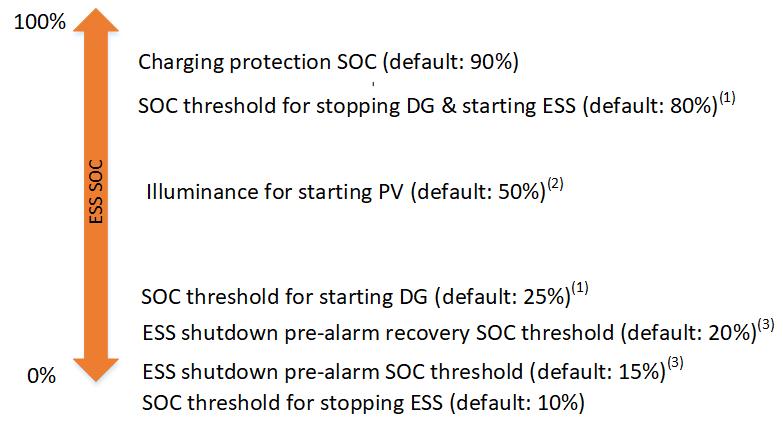
The illustration of SOC parameter settings and actual ESS SOC values under the Off-grid operation control strategy is as follows: