Remote Fixed Value
This function is used to make the plant output active power according to the target value remotely set in Third party scheduling mode.
-
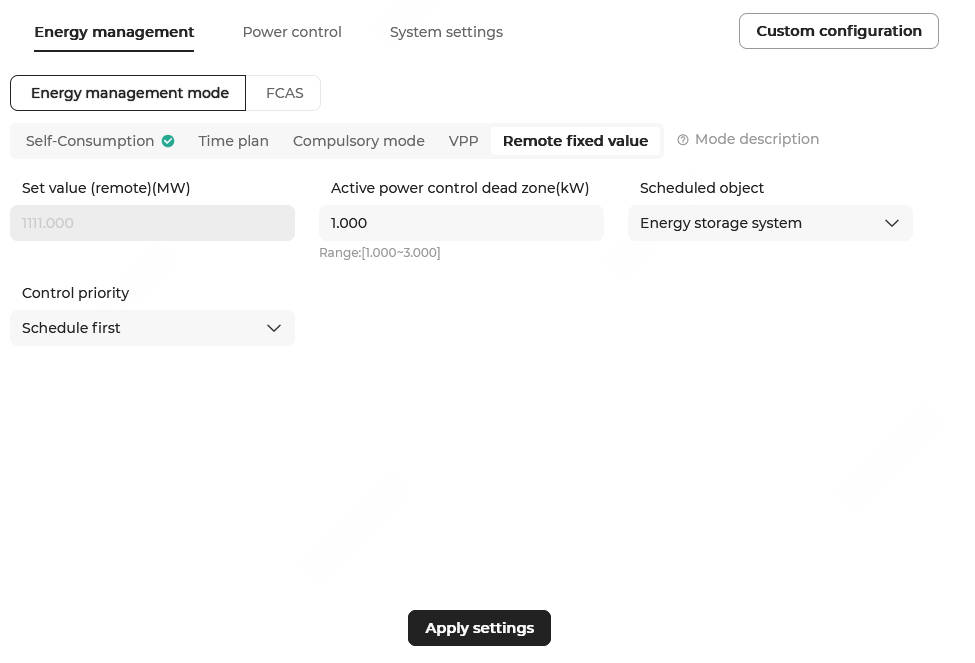
Choose Energy management > Energy management mode > Remote fixed value.
-
Configure the following parameters.
Parameter Description Set value (remote) (MW) Shows the remotely set active power when the scheduling mode is set to Third party scheduling. Active power control dead zone (kW) Set this parameter based on the actual power of the plant. It is recommended to set this parameter to 1% of the rated power.
It defines the range within which the target active power value can fluctuate. For example, if the target active power of the grid-connected point is 10 KW, and the control dead zone is set to 5 KW, then the target active power of the grid-connected point can range from 5 KW to 15 KW.
Scheduled object This parameter takes effect only when the Control priority is set to Schedule first.- Grid-connection point: The target power value set in active power control will be used to perform closed-loop control for the power of the grid-connection point.
- Energy storage system: The target power value
set in active power control will be used to
perform closed-loop control for the power of the
ESS.Note: This item is valid when active power control is enabled alone. If other control strategies such as overload protection are enabled, the target power value will be used to perform closed-loop control on the power of the grid-connection point.
Control priority - Local first: When the power command from third-party scheduling conflicts with the local control strategy, the local control command will be prioritized.
- Schedule first: When the power command from third-party scheduling conflicts with the local control strategy, the third-party scheduling command will be prioritized.
- Click Apply settings. In the pop-up window, enter the Task name, and click Confirm.